QuickBooks Online is the accounting integration available on Time Tracker Billing. Once connected, your billing work flows into your accounts without re-keying.
Connecting
- Go to Settings and open the QuickBooks Online tab.
- Click Integrate with QuickBooks Online.
- Sign in to QuickBooks and authorise the connection.
- Map your fields when prompted — this is where you tell each system which record corresponds to which.
What syncs, and which way
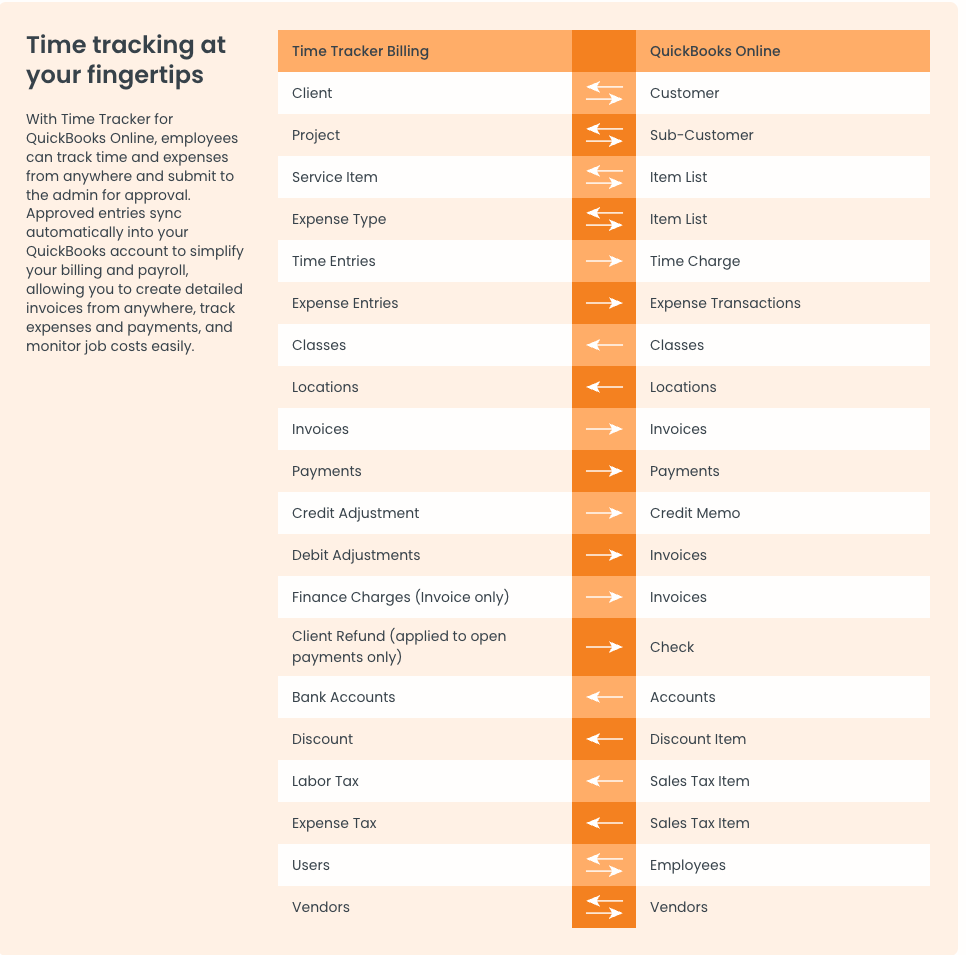
The full field map, with arrows showing the direction each record type travels.
Reading the directions
- Both ways — records stay matched in either system
- To QuickBooks — the work you do in Time Tracker Billing flows into your accounts
- From QuickBooks — your accounting structure, such as tax items and bank accounts, is pulled in so Time Tracker Billing uses the same definitions
Important: Tidy up duplicate and near-duplicate client names before you connect. "Acme Corp" in one system and "Acme Corporation" in the other will not match, and you will end up with two customers in QuickBooks.
If the connection stops working
Authorisation tokens expire periodically. If records stop syncing, reconnect from the QuickBooks Online tab. It is also worth checking your field mapping — anything created after the initial setup may not be mapped yet.