To submit a new time-off request, tap the + icon in the top-right corner of the Time Off screen.
Time Off Form
Field
Description
Time Off Code
Required. Select from the dropdown — for example, "Personal Day - Paid (38.00 hrs available)". The available balance is shown in parentheses so you know how many hours you have remaining.
Date
Required. The date of the time off.
Hrs / Min
Required. The number of hours and minutes you are requesting.
Add Date
Tap this button to add additional dates if your time off spans more than one day.
Description
Optional. A reason or note for the request (up to 1,000 characters).
The bottom of the form shows the Total Hours for the request. Tap Save (green) to submit or Close to cancel.
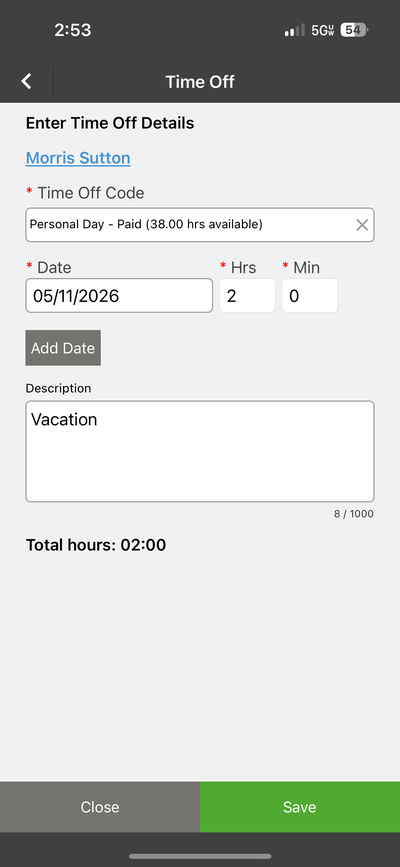
Requesting time off — available balance shown in the Time Off Code field
Tip: The available hours for each Time Off Code update in real time as you use them. If you do not see enough available hours, check with your admin — they may need to adjust your balance.