Category: Invoices • Premium & LawBility
Tap any invoice in the list to open the View Invoice Detail screen. This shows the full formatted invoice including your company name, the client name, invoice number, invoice date, and a detailed table of line items with columns for Date, By, Type, Service Summary, Hours/Qty, Rate, and Amount.
At the bottom of the invoice detail, you will see the Total Hours and Total Invoice Amount.
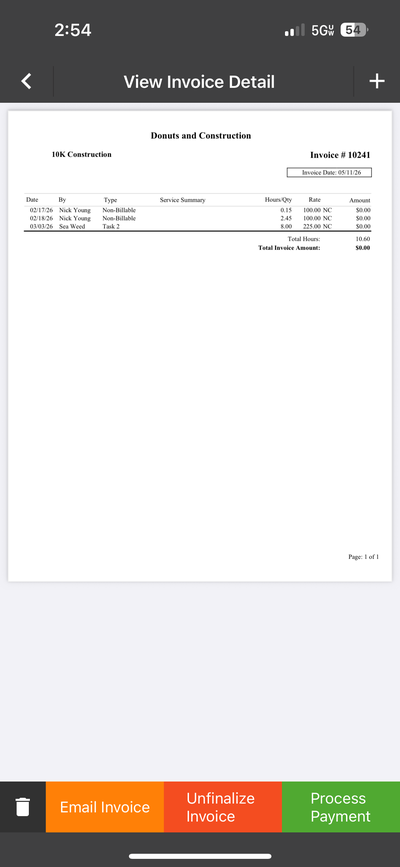
Invoice Detail — view the full invoice and take action
Invoice Actions
Below the invoice detail, four action buttons are available:
Button
What It Does
Delete (trash icon)
Delete the invoice. You will be prompted to confirm.
Email Invoice
Send the invoice to the client by email.
Unfinalize Invoice
Revert a finalized invoice back to pre-bill status so it can be edited.
Process Payment
Record a payment against the invoice.