Time Off Accrual policies automatically grant time off hours to employees on a recurring basis. Instead of manually adding vacation hours at the start of each year, the system accrues them automatically based on rules you define — with support for different rates based on tenure.
Configuring an Accrual Policy
- Go to Admin > Settings > Time Off.
- In the Time Off Codes table, find the code you want to configure (e.g., Vacation).
- Click its Accrual Type to open the accrual settings.
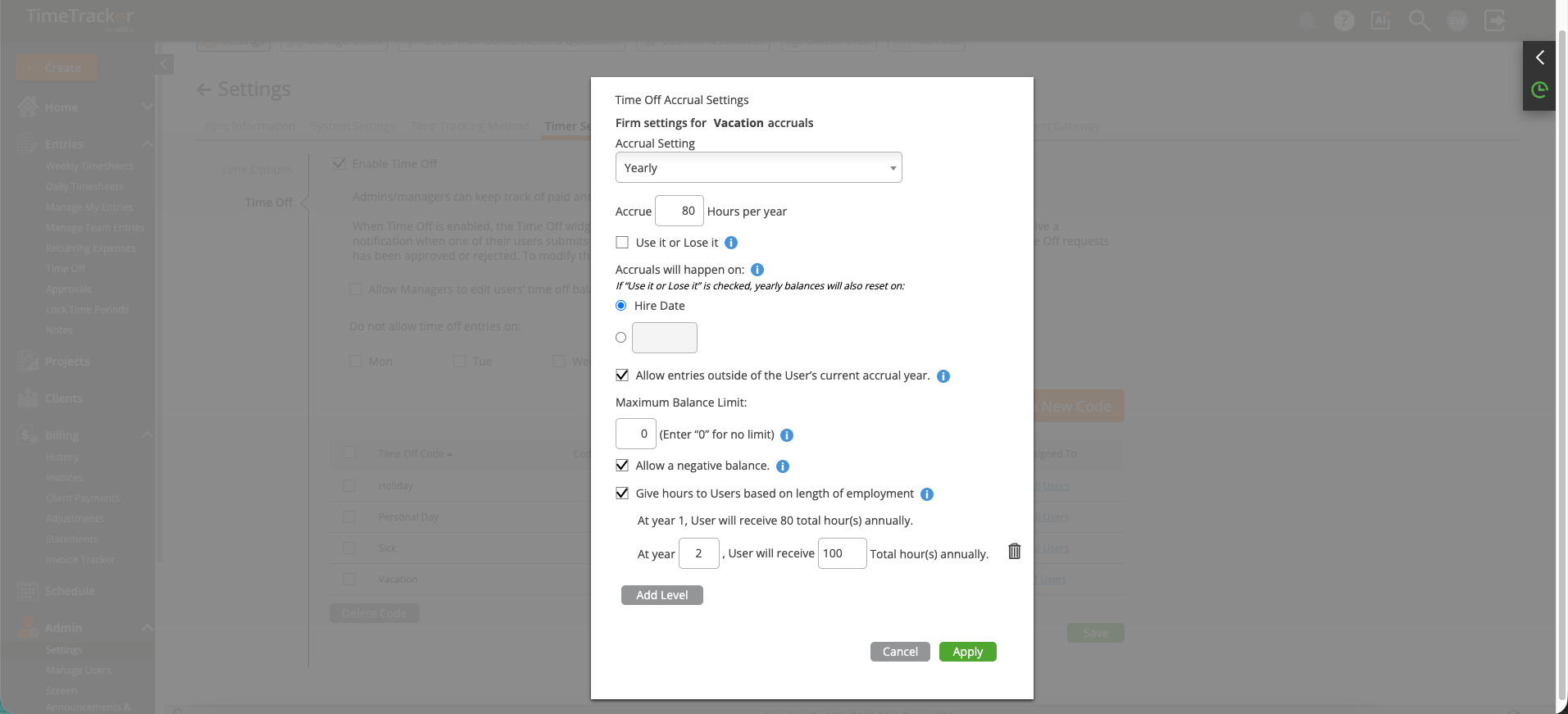
The Time Off Accrual Settings dialog defines how and when hours are granted for each time off code.
Accrual Options
- Accrual Frequency — Choose how often hours are granted: Yearly (lump sum), Monthly, Per Pay Period, or Manual (admins add hours by hand).
- Accrue Amount — The number of hours granted per accrual period (e.g., 80 hours per year, or 6.67 hours per month).
- Use It or Lose It — When enabled, unused hours do not roll over to the next period. Balances reset on the accrual anniversary.
- Accrual Date Basis — Choose whether accruals are based on each user's Hire Date (individualized) or a specific calendar date (company-wide, e.g., January 1).
- Maximum Balance Limit — Cap the total hours an employee can accumulate (enter 0 for no limit). Prevents excessive unused balance buildup.
- Allow Negative Balance — Lets employees request time off even if they've used all accrued hours. Useful for flexible policies; disable for strict accrual enforcement.
Tenure-Based Accrual Levels
Reward long-term employees with higher accrual rates. Under "Give Hours to Users Based on Length of Employment," define tiers:
- Year 1 = 80 hours/year
- Year 3 = 100 hours/year
- Year 5 = 120 hours/year
Click Add Level to add additional tiers. The system automatically applies the correct tier based on each employee's hire date.
Tip: Employees can view their current accrual balances on the Balances tab of the Time Off page. Encourage your team to check their balances before submitting requests.