
Applies to: Workforce · Premium · LawBillity
You can download all of your firm's data at any time. Use it as a backup, to analyze in a spreadsheet, or to keep a copy before you cancel.
Exporting Your Data
- In the left menu, click Admin > Settings, then click Firm Information.
- Under Export all data for your firm, click Export.
- Wait a few moments until you see File has been created. Click here to download.
- Click that link to download a .zip file.
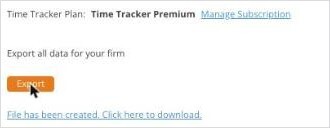
The Export button and the download link on the Firm Information page.
What's in the File
The .zip file holds one CSV file for each kind of data. Open them in Excel, Google Sheets, or Numbers.
Some files are nearly empty if your firm doesn't use that feature.
Tip: To export just some of your data, such as one month of time entries, use a report instead and export it from there.