
Applies to: Workforce · Premium · LawBillity
Time Tracker can use your firm's own words throughout the app. A law firm might say Matter instead of Project, and a contractor might say Worker instead of User. Menus, lists, and buttons all change to match.
Changing Your Terms
- In the left menu, click Admin > Settings, then click Customize.
- Click Term on the left.
- Type the word you want in any box. Use the singular form, such as Customer or Timekeeper.
- Click Save.
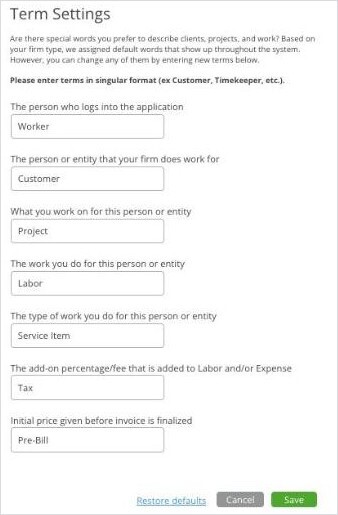
Term Settings, showing one firm's terms.
To go back to the original words, click Restore defaults.
Note: Our help articles use the standard words: User, Client, and Project. If your firm has changed them, look for your own word in the same place.